Tag: film

  • Finding Your Content North Star in The Age of AI

    Finding Your Content North Star in The Age of AI

    The idolization of the creator economy has captivated Gen Z, Alpha, and Beta. This is a direct reflection of the rapid evolution of technology and the role it plays in our lives daily. These younger generations see opportunity, influence, and prosperity when using technology, social media, and AI. Brands have followed suit by investing more in blogs, podcasts, social media campaigns, and newsletters to meet their audiences where they are at any given point.

    It doesn’t stop here. Search behaviors are changing, content ecosystems are expanding, and AI is blurring the lines of ethics and creativity, reshaping how we create and consume content. Regardless of these shifts, one principle remains the same: content without purpose is just noise.

    Let’s explore how these tools have changed over decades and how, despite these changes, content strategy remains a north star to ensure the value of content serves both its audience and the organization or individual creating it.

    Combining Curation & Creation is The Secret Sauce

    To avoid the easy pitfall of just publishing content arbitrarily with no goal in mind, you need to take a step back to stop chasing the trends and likes and look at the bigger picture. Successful content strategists aim to complete this set of steps.

    • Identify problems and opportunities
    • Convince leaders and get the resources
    • Get stakeholders on board
    • Set and align on project objectives
    • Execute the project


    Let’s look at the specifics when it comes to project objectives. A great way to think about this is that you need to “set the table.” Meghan Casey, author of The Content Strategy Toolkit, explains the importance of setting the table perfectly.

    “Preparation is the key to a successful alignment session. Preparation means a few things here. First, it means getting the right people in the room. Second, it means planning how you’ll get from “what are we doing here?” to “let’s move forward.” And, third, it’s helping your stakeholders be engaged, thoughtful participants.


    Executing these five steps combined with tasteful curation unlocks the “secret sauce,” aka a compelling content strategy that inspires a group of people to buy, attend, subscribe, or participate.
    Image Source: Medium

    When It Started. How It’s Going

    The accelerated rate at which content has evolved over the years makes people feel overwhelmed trying to keep up. Although these shifts have changed the way we search, purchase, and connect with information, the fundamental purpose of content strategy hasn’t changed: helping people learn and make informed decisions that support their goals or an organization’s goals. That is content strategy at its core. That’s what remains the same. You might be asking yourself, what has changed then?


    What’s changed is the complexity of the ecosystem content strategists are now navigating. When you look at content strategy historically, it started as simply managing one-dimensional channels and pieces of content. Now, content strategists are forced to think bigger, move faster, and manage entire ecosystems that span a digital footprint that’s never-ending. This includes, but is not limited to, websites, social media, podcasts, newsletters, search engines, videos, and even AI-powered digital experiences. Publishing is no longer enough. Scalability, discoverability, and moving the organization’s goals are the expectation.


    In 1995, one of the biggest shifts happened. Access to the World Wide Web. Content transitioned from monolithic documents to hyperlinked pages. Rachel Ann Baillie poses an interesting argument related to this in her piece, An Uneven History of Content Strategy.


    Baillie suggests that the rise of the World Wide Web shone a spotlight on the need for content strategy more than ever.

    “The most logical conclusion is that the Web created new, exponentially complex challenges for content publishers. One anecdotal report from a large Silicon Valley hardware/software company talked about the mess that had ensued because of the organic growth of their online technical content, and the 100+ technical writing contractors they had to bring in to audit, categorise, and curate the over one million pages, to bring their corpus into some sort of usable form”


    The beginning of generative AI and deep learning can be traced back to the 2010s. LLMs (large language models) are trained on a large amount of online data. This data includes, but is not limited to, content, topics, and various styles of writing. The biggest initial breakthrough with LLMs was their influence on search and understanding how to recognize patterns in information.
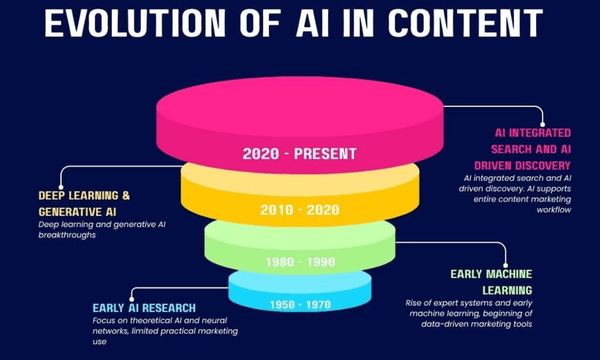
    Image Source: Quibble


    Fast forward 10+ years to the 2020s and AI’s role has shifted dramatically. Here’s how Anna Morrish, the author of the article, “The evolution of AI in content strategy,” explains it.

    “AI is no longer just supporting data analysis or automating smaller tasks; it is now directly involved in creating content itself. As a result, the way we work has evolved. Tasks like ideation, outlining, and drafting can now be completed much faster.”


    Now more than ever, there’s this corporate pressure telling Content Strategists, Content Marketers, and Creators it’s all about volume. In reality, that’s never been the case. We can’t stop the fact that AI technology and platforms are reshaping how content is created and distributed, but we can focus an equal amount of time and energy on creating a strategy that gives your content purpose. Understanding your audience, aligning all your stakeholders, and building systems that create value instead of distractions and noise.

    Works Cited


    Bailie, R. A. (2021, February 5). An uneven history of content strategy. Medium. https://rahelab.medium.com/an-uneven-history-of-content-strategy-d514cfd7eee5

    Morrish, A. (2026, June 8). The evolution of AI in Content Strategy. Quibble. https://quibble.digital/insights/the-evolution-of-ai-in-content-strategy/

    Casey, M. (2015). The Content Strategy Toolkit. New Riders. 2026, http://www.newriders.com
  • Content is Everywhere. Intention is Everything

    Content is Everywhere. Intention is Everything

    The evolution of digital technology, the integration of social media in daily life, and pressure to focus on quantity over quality by leveraging AI have commoditized content. You might be asking yourself, what defines content?

    Content is the packaging of information to convey an idea or argument to a specific target audience. Typically, content is tied to a business objective. The most common forms people interact with daily include videos, photos, graphics, podcasts, case studies, and memes. Understanding your experience with content to discern the form it assumes (digital or physical), define how you catalog and index it, and decide whether AI is a superpower or hindrance will enrich your life, educationally and emotionally.

    The Push and Pull of the Content Seesaw: Digital vs. Analog

    The saturation of digital social media platforms, coupled with an extreme pressure to lean into AI, is going to create an explosion in analog. Analog forms of media were never extinct, but the shift started in 2007 when the first iPhone was released. It gained more traction in 2010 when Instagram launched, and then grabbed the world’s attention in 2020 when TikTok took off because of the COVID-19 pandemic. To ground these time stamps with some perspective, according to The evolution of AI in content strategy, a blog published by Quibble, “People, especially younger generations, are no longer relying on Google, and 74% of Gen Z’s use TikTok as their primary search engine.”

    Fast-forward to 2026, and within less than a decade there’s already a new noticeable shift happening: the explosion of analog.

    People are starting to struggle with how much digital there is. People are anxious. People are self-regulating their digital consumption. People are opting into “touching grass,” instead of growing their Rolodex of followers to send memes to while they doomscroll.

    Image Source: MemeAnalysis


    For the last decade or so, digital hasn’t pushed its feet up on the seesaw to balance out with analog. But now? It’s beginning to happen, and evident from the resurgence of analog technology including vinyl, wired headphones and point and shoot cameras from the 2000s.

    My relationship with analog starts and ends with consumption vs. creation. I have a sincere appreciation for physical media and always opt to buy video game cartridges instead of digital files. I also make a concerted effort to self-regulate my digital screen time using an app. ScreenZen overrides my iPhone’s screen limits and only allows me to check specific social media platforms a set number of times per day for a specific number of minutes. I highly recommend checking it out if you’re looking for a tool to help you self-regulate digital consumption.

    Once you understand how to balance this seesaw, the next step you can take to leverage content in a way that enriches your life is to define how you index and organize it.

    Creating a Personal OS

    Image Source: Created by Author


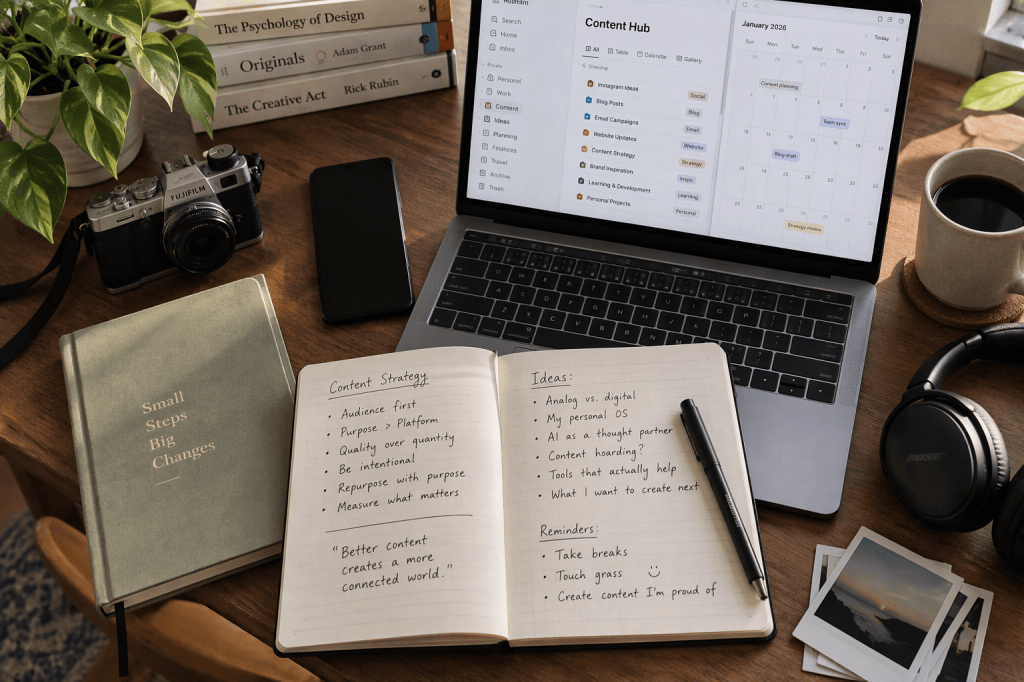
    Having an idea of how you’re going to get from point A to point B goes a long way. When it comes to working on a project with multiple people, you must create a single source of truth and lean into sharing bits and pieces of your personal operating system with your team. Meghan Casey, author of “The Content Strategy Toolkit,” explains how teams get on the same page by creating a project charter. This document contains components of a project, including a lexicon (a list of words or phrases with their definitions), a timeline, a budget, and a clear project team matrix that outlines roles and responsibilities. This connects directly to content strategy, specifically organization. SAAS tools like Monday.com, Airtable, and Asana are some of the most robust options that lean into flexibility. Users can create project boards with tasks in any view you can think of, whether it’s a list, calendar, Gantt chart, or Kanban. Because my career is in content marketing, I use a combination of Microsoft OneDrive for file storage and Airtable for content management. This combination enables me to leverage Airtable to collaborate easily with various teams inside and outside my department. I can also reference OneDrive months later to find final files if I ever need to reuse a piece of content or repurpose it for a new project.

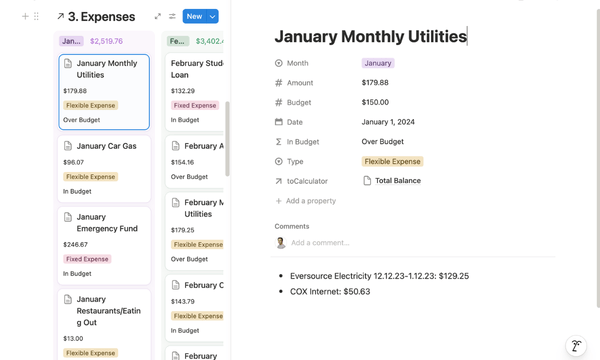
    In my personal life, I use the knowledge database management tool Notion to create a repository where I manage my finances, plan trips, and store content. I usually organize this content by the month it’s happening. So, when you dive into my finance tracker, for example, you’ll see months organized in color-coded columns and individual cards within each column. You click on a card to expand the details. I’ve included a screenshot below so you can see what I mean.

    Image Source: Created by Author


    In terms of what defines a content hoarder? A content hoarder, in my mind, is someone who holds on to a form of content (whether that’s pictures, videos, writing, or something else) and it no longer serves any purpose or is duplicative. However, I need to acknowledge a caveat to my previous statement. If we are talking about digital content, the phrase hoarding is subjective. If you have a clear system organizing everything by using a folder structure, and it’s not preventing you from doing your day-to-day work, more power to you for having a graphic you made in 2018 when you started your first job as a content marketer. Being able to see the progression of your work, understand its evolution, and unpack what you learned is a superpower in and of itself. Especially as we enter this new era of AI.


    Artificial Intelligence: The Good. The Bad. The Opportunity.

    Image Source: Pete Sena


    The role content strategy plays involves both project and operational frameworks. It helps to define, prioritize, integrate, systematize, and measure content. Brain Traffic, a marketing consultancy open for 25+ years, created a “Content Strategy” quad to split out the two core concepts and discern the different tactics that happen within each process.

    “More than anything else, effective content design requires knowing your audience—their needs, preferences, and expectations. Systems design is the process of defining the architecture, modules, interfaces, and data for a system to satisfy specified requirements.”

    AI plays a role in both content design and systems design. If you can understand and clearly define what its roles are, while still maintaining the integrity of the fundamentals of content marketing that demonstrate creativity, expertise, and clear strategic thinking, you’ll turn it into a superpower instead of a hindrance. The evolution of AI in content strategy, a blog published by Quibble, lists some great “Do’s and Don’ts” for AI, including the following.

    “Do’s: Use to speed up research and processes, create proper, detailed briefs, add your own insights and examples, keep content structured and clear. Don’ts: Publish AI content without reviewing it, rely on AI for strategy, ignore tone of voice, chase quantity over quality.”

    Using these recommendations as a starting point is exactly how I’ve tackled integrating AI into my professional and personal life. I often use AI as a thought partner to converse with. I have a conversation with it that spans anywhere from 2-4 prompts before I take the output it gives me and use it as a starting point for the piece of content I’m creating.

    The growing pressure companies have forced on their employees has exacerbated the public image of AI and led to a vast number of people using it as a crutch. This is why content has become commoditized.

    In my opinion, the problem isn’t AI. The problem is forgetting the fundamentals and using AI to replace them. The best content understands its audience, uses strategic thinking, creativity, and informed judgment. It has a human touch. Sure, AI can accelerate these processes, but it can’t replace them.

    I think about my relationship with content like a seesaw. I don’t have to choose between analog or digital. I have to learn how to be intentional with my choices and not lose sight of the fundamentals. Whether it’s organizing my info in Notion or using AI to brainstorm captions, the goal is and always will be to use content intentionally.

    Works Cited


    Blazer, Liz. Animated Storytelling: Simple Steps for Creating Animation & Motion Graphics. Peachpit Press, 2020.

    Sena, P. (2026, March 24). My chief chaos officer left. so I built one. My Chief Chaos Officer Left. So I Built One. https://petesena.substack.com/p/my-chief-chaos-officer-left-so-i

    Traffic, B., & Halvorson, K. (n.d.). New thinking: Brain traffic’s content strategy quad – brain traffic blog. Brain Traffic. https://www.braintraffic.com/blog/new-thinking-brain-traffics-content-strategy-quad

    Morrish, A. (2026, June 8). The evolution of AI in Content Strategy. Quibble. https://quibble.digital/insights/the-evolution-of-ai-in-content-strategy/

    Casey, M. (2015). The Content Strategy Toolkit. New Riders. 2026, http://www.newriders.com

  • Designing the Daily Ritual: Wordle’s Quiet Joy

    Designing the Daily Ritual: Wordle’s Quiet Joy

    One of the most powerful ideas to unlock as a storyteller who uses animation is to understand the right animation technique to express. Developing the most clever and creative idea ever is one feat, but being able to share that idea with the world in a compelling, impactful way is a completely different feat. With saturation of content and more digital distractions than ever, it’s so difficult for any artist or brand to stand out in the “sea of sameness.” That’s why I believe the riches are in the niches, and knowing how to capitalize on this in two easy steps will get you further.

    Liz Blazer, author of Animated Storytelling, advises motion designers and artists to embrace “Show and Tell.” Package your project in a cohesive way that includes all the essentials like Title, Logo, Synopsis, Bio, and Story. Once you’ve packaged your project, Blazer suggests shifting your focus to creating a network. This will compound and help you find relatable connections, inspiration, and create interest in the work you’re doing.

    Animated Storytelling by Liz Blazer and seven weeks of Motion Design tutorials and projects forced me to leave my comfort zone. I am very used to writing, curating, and researching in my current job, but this course brought me out of that comfort zone and taught me how to really embrace experimentation and become more comfortable in the unknown through creating.


    Research


    ADVANCED MOGRAPH/MOTION GRAPHICS IDEAS ON ALIGHT MOTION [+free preset and xml file]


    This energetic compilation video has plenty of micro-interaction ideas that influenced me when it came to creating some of the pacing and rhythm in my Wordle animation. Principles, including snappy scaling, fast transitions, bold colors, and “pop” animations, were all aspects I considered creating in After Effects after watching this video.

    Google Logo Animation Series Teaser – Motion Pro Exclusive:


    This video caught my attention with its super clean timing and shape‑layer-driven animation. Both aspects directly inspired parts of my Wordle animation. This piece showcases how simple geometrics can create visual impact when they’re paired with contrasting colors, bold fonts, and intentional animations, including smooth easing and scaling.

    Building a Stunning Edge of Tomorrow-Inspired Title Sequence:


    This tutorial dives into the nitty-gritty details of techniques like fractal noise, displacement maps, VHS textures, and more. I am not at this advanced level of Motion Design yet, but its elegant typographic motion, visual polish, pacing, and atmosphere inspired me to create this project. Specifically, my text card outro animation.


    Create

    Wordle Daily Ritual: Motion Design Sequence!


    After learning the basics of Motion Design over a brief seven-week period, I wanted to challenge myself by creating a motion-graphics sequence inspired by the New York Times Games, specifically focusing on Wordle.

    The goal was to capture the satisfying, clean, logical interaction patterns that create this everyday ritual millions of people love.

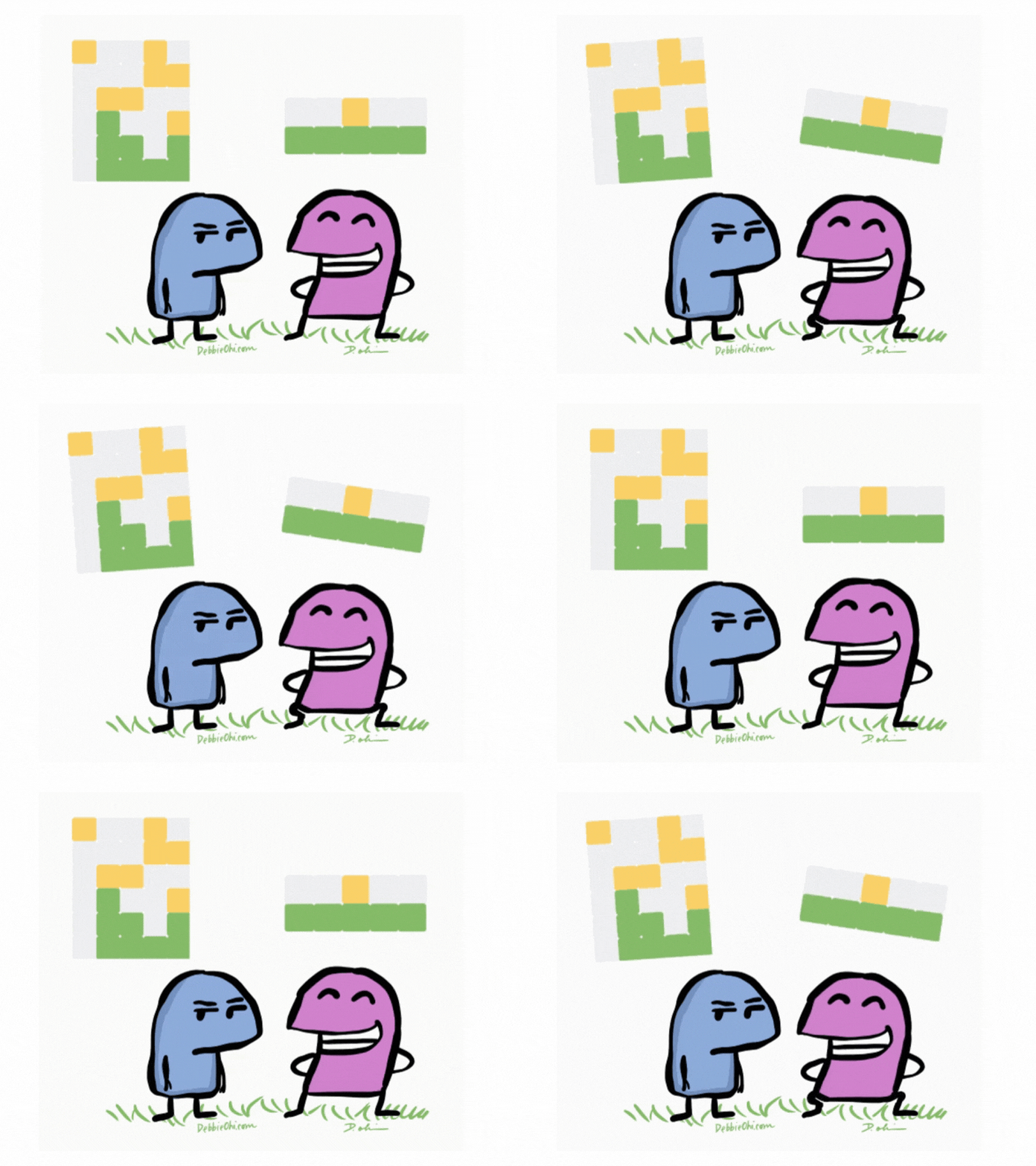
    I created this 5×6 Wordle Grid entirely in After Effects using shape layers and repeaters. Creating this entirely in AE compared to Illustrator, and importing any files, enabled me to create this scalable layout that I could easily manipulate with duplications and animations.

    The toughest part about this project was creating the Y-rotation tile flip animation. I knew Wordle tiles needed to flip in 3D to reveal a color change at a midpoint 90-degree rotation. After many hours of experimentation plus trial and error, I figured out that I need to meticulously isolate each tile by converting it into its own layer, zero out all internal transformations, center anchor points to each tile, and proceed with creating animations using keyframing on all 60 layers (each tile and letter).

    The letters were added as separate text layers to parent link each one to a corresponding tile. The animation on the letter is opacity so each one is revealed exactly at the midpoint flip.

    I tackled sound as the next component of this project. I knew subtle click and flip sounds would elevate this motion graphics sequence and make it look more professional. This particular sound really brought the motion to life, and helped emphasize the importance of the timing where each word guess happened at a five-second increment, totaling 30 seconds to guess the last word correctly.

    To complete the animation, I created an outro card with text reading “THANK YOU FOR WATCHING.” This fades in on a white background and has a gentle camera push effect using a null object. I did this to create a cinematic polish.

    This project helped me explore After Effects on a much deeper technical level, especially with shape-layer animation, 3D rotation, anchor-point management, and timing logic.

    I’m really happy with how this came out and look forward to deepening my skillset in Motion Design.

    Works Cited


    Blazer, Liz. Animated Storytelling: Simple Steps for Creating Animation & Motion Graphics. Peachpit Press, 2020.

  • Lights Out: Crafting a Logo Stinger Through Technique

    Lights Out: Crafting a Logo Stinger Through Technique

    One of the most powerful ideas to unlock as a storyteller who uses animation is to understand the right animation technique to express a big idea and be the very soul of your story. To find this “perfect match,” you must start by considering the format in which the content is viewed. It used to be as simple as film was watched in theaters and commercials on TV, but the evolution of technology brought content to tablets, phones, and watches. Now, you need to choose a technique that suits the format you believe makes the most sense.

    Animated Storytelling by Liz Blazer details several animation and motion graphic styles and techniques that are used to tell compelling stories. This list includes:

    1. Hand Drawn
    2. Stop Motion (2D and 3D)
    3. CGI (2D and 3D)
    4. Fluid Transitions
    5. 2D/Vector/Kinetic Type
    6. Handmade
    7. Collage
    8. Film & Type
    9. 3D

    All of these styles and techniques have their own unique look and feel that immerses a viewer in a way that creates its own unique emotional connection. Understanding the heart of your project to discern what style conveys the tone you are trying to express will enable you to use animation that enhances your storytelling.

    I’d also like to note that the research and Logo Stinger I created below draw inspiration and utilize the 12 Principles of Animation!


    Research


    Formula 1 2026 Opening Titles (Staging)


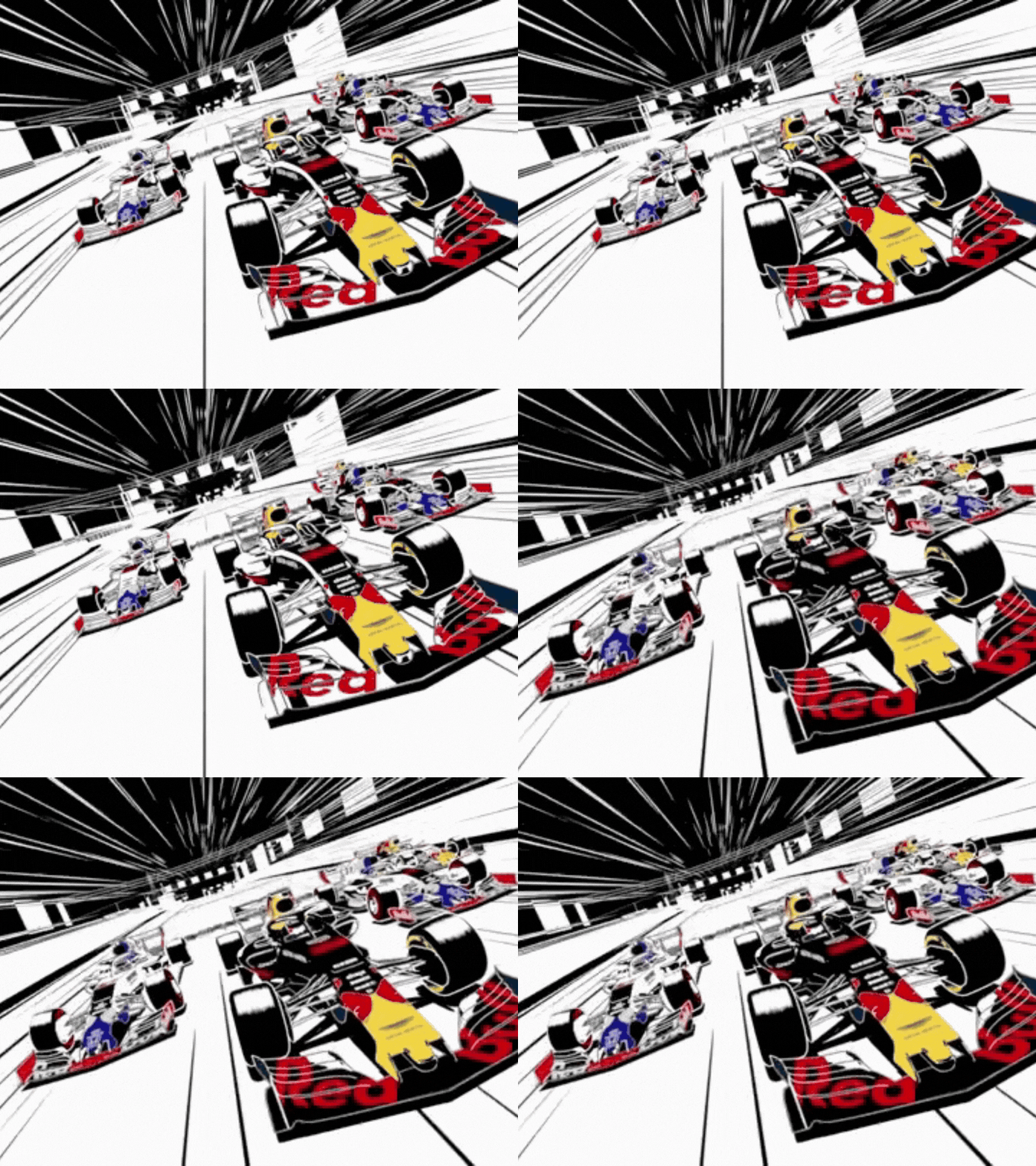
    Every year at the beginning of a new season, Formula 1 Racing releases a new title intro sequence to debut the driver line-up in a fun and dynamic way. This title sequence has lots of motion design elements. One specific principle it uses that I want to highlight is Staging. From lighting and camera angles to background and foreground composition, the drivers are directed to make specific poses, stand tall, or sit down, and showcase themselves and their team in a specific way. You see this with drivers like Valtteri Bottas running his fingers through his mustache, grinning, Kimi Antonelli shaking his hands and fingers to do the “Shakra bro” sign, and plenty of other drivers holding their helmets doing different things.  

    Mulan (Follow Through and Overlapping Action)


    This principle is used to create fluid and realistic movement. These two techniques are unique because they entail parts of the character in motion even after the character is done moving and is still. The beginning of this scene from Mulan, when the characters break out into the “Honor to Us All” song, is a great demonstration of follow-through. When Mulan rides into town on a horse, jumps off, and stops, she’s still, but her hair still moves and flows with the wind.

    Elsa and Anna’s Magical Moments | Frozen (Appeal)


    Creating or curating a thoughtfully designed character that’s consistent and emotionally resonates with viewers is no easy feat. This is done by best-in-class animators who are meticulous with character design, take the time to develop personality nuances, and even go the extra mile by giving characters subtle facial expressions. Elsa from Disney’s movie Frozen is a great example of a character who has all of this.


    Sabrina laughing with Haunter | Pokémon anime (Exaggeration):


    A majority of the 12 principles of animation are grounded in realism. However, avoiding a principle like exaggeration risks your animation looking too real and dull. This is on full display in this scene from the popular anime Pokémon, when, after the gym leader Sabrina loses, her Haunter is seen laughing and making exaggerated facial expressions with its mouth wide open.


    Animation Assignment – Squash and Stretch (Squash & Stretch):


    This short animation showcases the ability to change objects as they move to convey a variety of weights and flexibility. You see the rubber band being stretched and shot off the character’s fingers to move fast, and then it gets squashed on impact and turns into a tie for a box, and eventually becomes the rubber band for a slingshot.


    Create

    Logo Stinger: Lights Out and Away We Go


    Creating a Logo Stinger was equally challenging and fun. I didn’t have a professionally finalized personal logo, so I started by creating one that would be good enough to use as a Logo Stinger. My wordmark logo consists of three elements: KA letterform, starting race lights, and my full name spelled out. The goal was to create something that’s modern, smooth, and F1-inspired.

    The idea behind the Logo Stinger is a simple concept. Lights out → Go → KA reveal. I prepared my assets by separating the layers in Illustrator that I knew I wanted to animate, including each set of two circles that represent stoplights, the traffic light structure, and the KA wordmark. To animate each stop light, I used keyframing to change the opacity of the lights to create a hard cut that matches the race start of Formula 1.

    For the KA wordmark,  I revealed it right when the lights turned off by using the Animate Scale function in After Effects. I also added easy ease to these keyframes to make the animation feel snappy and intentional to match the “start your engine” energy of F1.

    I decided to challenge myself and add an optional camera shake to the wordmark by creating a null object with a wiggle effect that’s linked to the wordmark through the Parent & Link feature.

    I experienced difficulty figuring out had to get the null object and wiggle to only happen for a set period of time compared to the entire animation. After lots of experimentation, I decided to make multiple layers of the wordmark for different sections of the Logo Stinger to solve the issue.

    Lastly, I decided to add my full name spelled out and gave it a micro letter tracking ease animation. I thought the subtle, calm reveal would complement the boldness of my wordmark. To tie everything together, I added the Formula 1 race start noise to the lights animation and a radio sound to my wordmark reveal. The radio is meant to be ironic and slightly dramatic compared to a race start.

    I’m looking forward to iterating on this in the future so it’s more polished and portfolio-worthy.

    Works Cited


    Blazer, Liz. Animated Storytelling: Simple Steps for Creating Animation & Motion Graphics. Peachpit Press, 2020.

  • Ideas Are Worth Nothing Without Execution

    Ideas Are Worth Nothing Without Execution

    The beauty of Motion Design and Animation? It’s a limitless medium that uses structures to turn visual elements into a cohesive story that creates an emotional impact. Defining a consistent theme and taking time with the storyboard process are two of the most foolproof ways to create a memorable animated story.

    Animated Storytelling by Liz Blazer taught me how to plan out “beats,” moments, or active steps in your story that move the plot forward. Blazer also does an excellent job of breaking down the differences between linear and non-linear story structures and offers storytellers four different types of non-linear structures to use: Book Ending, The Countdown, The Puzzle, and The Beaded Necklace. Understanding all this helped me immensely with storyboarding for a personal animated introduction video I created.

    After I was confident with my storyboard and curation of audio and visual files, I followed Blazer’s advice by creating an animatic, a video version of my storyboard laid out in sequence on a timeline in After Effects with a soundtrack aligned to the video.

    Learning about specific aspects of storytelling and storyboarding enabled me to transform an idea into an executed animated video with a clear beginning, middle, and ending.


    Research


    IKEA, Together


    This video captures the limitless possibilities of customization and the beauty of “DIY,” something IKEA became globally recognized for. The transitions from room to room with bright colors are inclusive, and the upbeat pop song spliced together with tasteful, high-pitched sounds of fingers snapping to signal transitions is catchy. This motion graphics video makes the viewer want to visit the closest IKEA store to get lost in possibilities and dream up the next room to create in their home.

    Introducing Google Vids:


    This piece by Google is energetic, imaginative, and creates a perception for viewers that they can create anything. Between its pretty liquid glass search bars, cozy keyboarding typing noises, and captivating floating icons, you watch this video, enamored by the “shiny” possibilities of AI technology.

    Porsche Holiday | The Coded Love Letter


    We are in the middle of the next digital renaissance with the advent of AI. As a result of this new era, imagery and videos are all starting to look eerily similar, and there’s a resistance to this technology. The iconic car manufacturer, Porsche, went against the grain by creating this hand-drawn animated commercial for the 2025 holidays called “The Coded Love Letter.”  Its focus on Porsche’s design and history with hidden easter eggs, including the first license plate number of a Porsche, the tractor created by the founder, and the iconic race car, the pink pig, captured the brand’s human spirit.


    Create

    Meet Kyle Adams! Personal Intro Animation Video


    For this project, I created an animated introduction using the programs Audacity and After Effects! I started with storyboarding to create a clear structure of what this video would dive into. I knew I needed several scenes to introduce myself, briefly explain what I do for work, showcase a hobby or two, and highlight what I am striving to learn.

    After I created six storyboards and decided what type of media each scene would have (pictures, videos, or b-roll photography/footage), I moved on to Audacity. I wrote my script in a Word document, practiced two takes, and then nailed a final take where I said exactly what I wanted to. I edited the wave audio file slightly in Audacity to bump up the gain of the volume levels to land in a range of -12 through -6 to get as close as possible to maxing my narration out without distorting it.

    After I curated all of my audio files (narration and music), images, and videos, I brought them into After Effects to create the animated intro! For the first scene introducing me, because I was using two photos from a vacation I took to Portugal, I wanted my introduction text to animate in a way that complemented a cinematic and travel-documentary vibe. I landed on using a Playfair Display font that evokes an elegant, modern, editorial energy, and created a directional mask reveal to animate the text.

    Adding transitions to fade in and out for various audio tracks and the song I chose for this video, as well as keyframing different scenes to tie the whole video together, was quite challenging, but very rewarding! I’m excited to continue learning about Motion Design.

    Works Cited


    Blazer, Liz. Animated Storytelling: Simple Steps for Creating Animation & Motion Graphics. Peachpit Press, 2020.