A team of product designers, researchers, and communication strategists assembled to create PennyPal, a personal finance app targeting Generation Z to empower individuals with knowledge and skills to confidently manage their money, learn how to budget, and plan for a long-term, successful financial future. Over six weeks, we created PennyPal using the Design Sprints framework founded by Jake Knapp, a Designer who worked for Google Ventures. We completed the five Design Sprint phases as weekly workshops over Zoom. Using the visual whiteboard tool Miro and the design platform Figma, five of us collaborated successfully to define Design Sprint questions and long-term goals, assess the landscape and source inspiration, come to a consensus as a group, build a prototype of PennyPal, and connect with our target users to determine its viability and an answer to our question(s).
Sprint Overview
The Design Sprint methodology we followed is the Google Ventures framework that I mentioned above. This process guided our team through the following five phases.
- Phase 1: Map & Sketch – Understanding and defining what the problem(s) are that we’re trying to solve.
- Phase 2: Decide & Storyboard – The transition of ideas becoming actionable plans to progress solving the previously identified problem(s).
- Phase 3: Prototype & Refine – The creation of a tangible, clickable form of an idea that functions for real-world testing.
- Phase 4: Test & Collect – The moment of “truth” to gather real feedback for the first time.
- Phase 5: Reflect & Report – Reviewing and charting a course forward after analyzing all the data.

Problem Statement & Research
A person categorized in Generation Z (Ages 13-28) should use the educational smartphone app PennyPal to discover the ins and outs of financial literacy, improve their long-term budgeting habits, understand best practices for saving, and learn how to build an investing plan.
Sprint Activities
1). Map & Sketch
Creating a user map was a stand-out moment in this phase. Designing this after we selected the Sprint questions and long-term goals we are focusing on enabled the team to create a shared understanding of what a typical user would experience using PennyPal.
We focused on a couple major features like starting with a survey about the user, having a fun learning system about finances, and rewards to encourage the user to continue consuming the content. Our goal for the map was to make sure that once the Gen Z user learned everything, they would be proficient and confident in managing their finances.

2). Decide & Storyboard
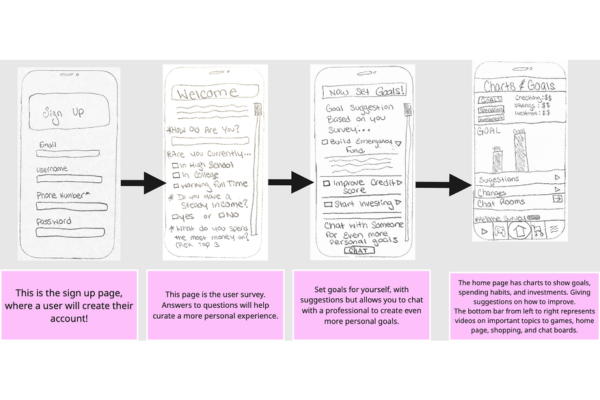
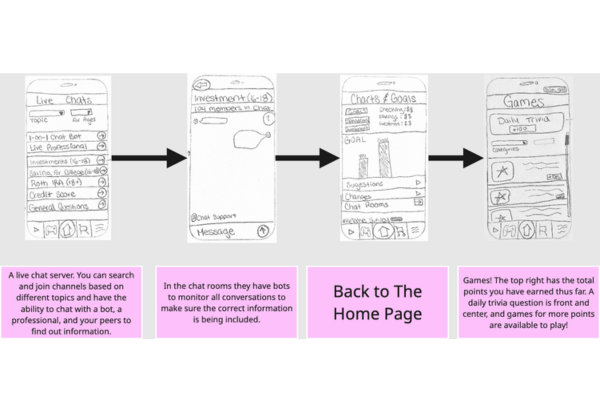
With Storyboarding, you create a step-by-step visual plan that outlines what your prototype will look like and how a user will interact with it. Something that resonated with the team from Storyboarding is how going back to the home page is accounted for in the beginning, middle, and end of the Storyboard. That’s a very typical interaction to have with an app. It’s like a soft reset, where once a user has explored a specific feature of the app, they’re very likely to go back to the home page to see any new announcements and go to another feature. One more aspect of our Storyboard that the team thinks is strong is the overall singular focus and clarity. This process set our team up well for the next phase of the Design Sprint, prototype & refinement.


3). Prototype & Refine
After our team had a strong understanding of what the PennyPal app product breakdown is, knew their task assignments, and built wireframes, it was time to build a high-fidelity prototype. We chose to first create an “App Map” in a platform named Marvel to understand what the hierarchy of PennyPal would be, and then transitioned to using Figma to create a high-fidelity version of PennyPal. We built out five sections: Homepage, Video, Chat, Games, and Rewards. The features were each designed and worked on by two group members. Once completed, the prototype was ready for user testing.

4). Test & Collect
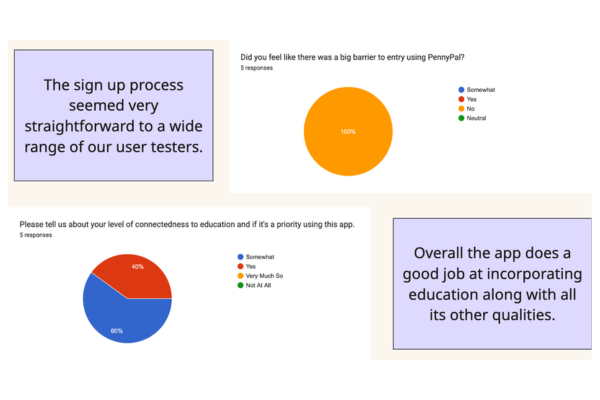
To develop our insights, data was collected at the end of user testing. Each tester expressed their opinions and thoughts on the app throughout the survey and gave the team rich insights to inform PennyPal’s future development. A few of these insights were:
- Overall, the app does a good job of incorporating education along with all its other qualities.
- PennyPal’s core features, including Daily Trivia and Goal Setting, prioritize Gen Z’s key traits and needs.
- There’s a resounding connectedness to education, but room for improvement on the entertainment side of things.
These rich insights connect directly back to the Design Sprint questions and long-term goals we established at the beginning of the process.
Results and Outcomes
After completing the Design Sprint and having built the PennyPal prototype, which went through user testing with five participants, we learned several things. Users would love it if we refined core features to create a smoother experience. The goal tracking feature was one that multiple participants suggested. Our analysis of the feedback we received also revealed that potential future PennyPal users want more interactive, community-driven features focused on friends-first before they connect with strangers about personal finance. PennyPal is poised to grow with our users throughout their major life transitions and can become a trusted tool to take control of your finances.
Learnings and Reflection
The biggest overarching challenges during this Sprint were getting all team members on the same page about work allocation and everyone joining our weekly workshops consistently. By the fourth phase of the Sprint, we were able to adjust our task division and allocation to make the team dynamic smoother and still give key contributors the best opportunity to tap into their strengths to make this Design Sprint as impactful and enjoyable as possible. The most unexpected design insight we learned was the overall desire from users to have a “friend-first” emphasis in features like the chat room, and one of the largest takeaways from working with a team throughout this entire Design Sprint is not underestimate the power of “working together alone” and how putting effort into that can improve the overall phase of a Sprint exponentially.

Conclusion and Next Steps
This team of product designers, researchers, and communication strategists learned over seven weeks that the agility and definitive structure of a Design Sprint was exactly what we needed to create a MVP of a financial literacy app targeting Gen Z. Leveraging the Design Sprint framework by Google Ventures, we developed translated ideas into reality through planning, research, teamwork, design, and analysis. Based on the final feedback and key takeaways from external user testing, we have several ideas to implement to refine PennyPal and bring this app to market to transform the lives of users in a unique way that blends education and entertainment to improve anyone’s personal finance literacy.

 Kyle Adams POV